 Role by Post by Dylan
Rooms
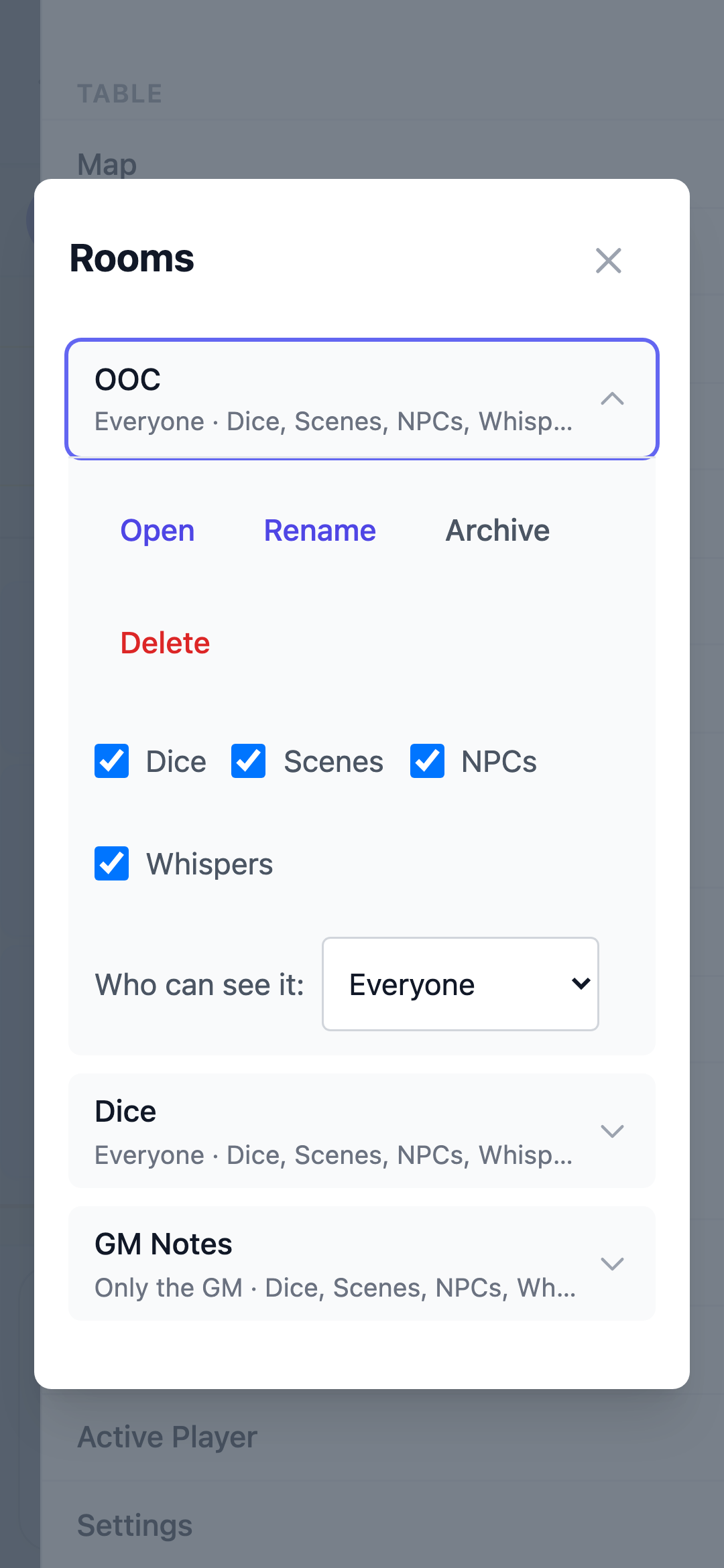
Rooms split a channel into separate conversations so the main story stays clean — an out-of-character room for table chatter, a room just for dice, a room for rules questions, or a private room for one player.
Every channel starts with Main, the original conversation. Rooms sit beside it in the room bar across the top of the channel — tap a room to switch to it. Messages, replies, and dice stay in the room you posted them in.
Creating and managing rooms
The GM creates rooms from the + Room chip in the room bar. The bar is there for the GM from the first visit, even before the first room exists, so + Room is always one tap away. A channel can hold up to 10 active rooms. (GM Tools → Rooms opens the manager, not the create dialog.)
+ Room opens one dialog with everything the room needs:
- Name — up to 40 characters ("Main" is reserved)
- Features — Dice, Scenes, NPCs and whispers, all on by default
- Who can see it — Everyone, Only the GM, or Invited players
- Players — when you pick Invited players, a checklist of the channel's players appears; the GM is never on it, and neither is anyone blocked in the game
The room and its invited players are saved together, so if the server refuses the room nothing half-built is left behind, and the confirmation says who can see it — "Visible to 3 invited players", never "everyone" for a private room.
The gear beside + Room, and GM Tools → Rooms, open the room manager. Every room is a single summary line — its name, who can see it, and which features are on — so the whole list is easy to scan. Tap a room to open its controls in place; only one room opens at a time. From there the GM can:
- Open a room — jump straight into it
- Rename a room
- Archive a room — it leaves the room bar but stays readable, and frees a slot for a new one
- Restore an archived room
- Delete an empty room — it asks first, in the same window; a room that still has messages can't be deleted, so archive it instead
- Choose who can see it — Everyone, Only the GM, or Invited players
- Turn features on or off for that room — dice, Scenes, NPC posts, and whispers
The manager does not create rooms; + Room does.
Who can see a room
- Everyone — every member of the channel
- Only the GM — a private workspace for the GM alone
- Invited players — the GM plus the players the GM picks; everyone else never sees the room at all
A restricted room shows a lock in the room bar.
What's shared, what's separate
- Unread is counted per room — and for Main — so a dot on a room (or on Main) means new messages there, and opening one never clears another
- Status is per room too — Main and each room keep their own status bar, so an initiative order in one room never shows up in another
- Search covers the whole channel by default; from inside a room you can switch it to This room only
- Rolls always show the whole channel's history, with each roll tagged by the room it was made in
- Dice, Scenes, NPC posts, and whispers can be turned off per room by the GM
- Images stay in Main — rooms are text-first
- A private or GM-only room only shows in the lobby preview for the players who can open it
Written by Alvaro Cavalcanti, creator of Role by Post.